
INTEGRATE TIME-LAPSE CAMERAS INTO YOUR PROJECT
BIM 360 DASHBOARD INTEGRATION
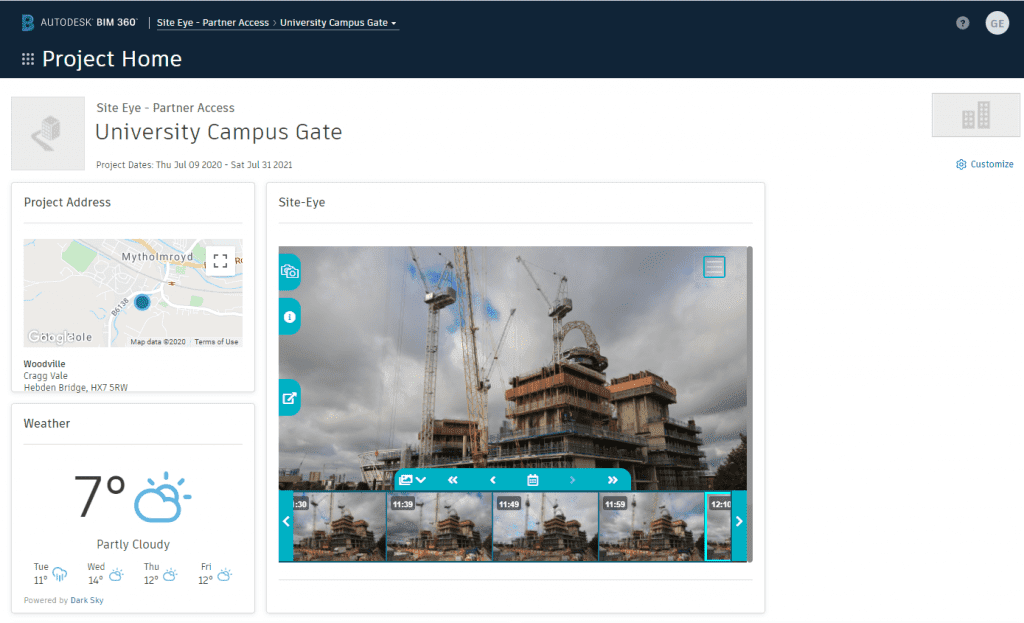
Site Eye have partnered with Autodesk Construction Solutions to bring our high quality site monitoring and time-lapse imagery to the BIM 360® project dashboard.
Site Eye have partnered with Autodesk Construction Solutions to bring our high quality site monitoring and time-lapse imagery to the BIM 360® project dashboard.
The BIM 360 Environment
We are one of the longest running time-lapse and construction imagery companies in the world and we are excited to be able to bring this vast experience to the BIM 360® environment.
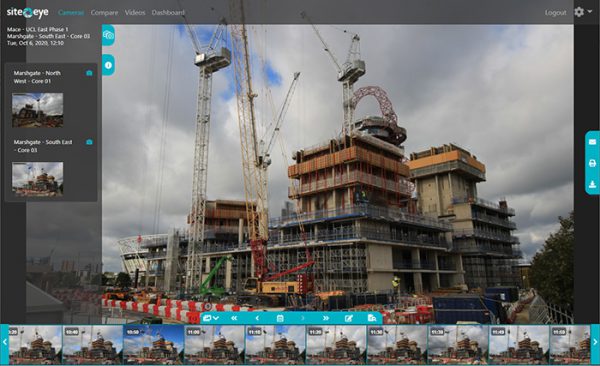
Using our Partner Card, you can now embed a fully featured instance of our Portal directly onto the dashboard.
BIM 360 Online Portal
This Portal allows you to view all the images from the cameras on the project as well as additional media, such as drone flights and time-lapse clips. You can also create and download time-lapse clips of specific dates and times and use these in other applications.
To view the films and images in more detail you can expand the Portal to full screen if required, then return it to the embedded size by clicking the “back” button.
Site Eye has partnered with Autodesk Construction Solutions so that a fully featured instance of the Site Eye online portal can be embedded on your BIM 360 project dashboard, using our Partner Card.
All the images from the cameras on the project, plus additional media such as drone flights and time-lapse clips.
Yes. You can create and download time-lapse clips of specific dates and times and use them in other applications.
No. You can expand the portal to full screen, then return it to the embedded size with the back button.


